
Originally Posted by klaz48
View Post
-
The character will run in the following case: you press W and while you are still hold it, you go to the Shift mode. Until you release the key, it should be running. -
Not sure why it happens that way but I think it could be considered as solved right now. Hope you will enjoy it this way.So i guess its a temp fix.
At the moment, please ensure that you have added Do not inherit for W in the Shift layer. This way the running will be stopped once you release this key in Shift layer. Still, we are working on the new Shift scheme which will allow you to make this process easier and more accurate. Stay tuned, new Shift mode will be added to the next major release coming at the end of the year.im holding "W" to go forward in a game, then i Hold my Shift 2 key, without pressing anything else(even if i then let go of W), my character will still go forward until I unhold the shift 2 key and press W again.Leave a comment:
-
Yeah, i did notice that myself afterwards, but that wasnt the problem either. Im not sure what the problem was, but for some reason Shift 1 wouldnt work with any keybind, but Shift 2 did. so I just transformed everything from shift 1 to shift 2, and used that instead. So i guess its a temp fix.Originally Posted by reWASDer View Post
However, i started noticing something annoying. lets say im holding "W" to go forward in a game, then i Hold my Shift 2 key, without pressing anything else(even if i then let go of W), my character will still go forward until I unhold the shift 2 key and press W again. Kinda made the purpose of what I was trying to do unviable because of it :\
Leave a comment:
-
1. Please add Unmap to the mouse (inside the Shift):
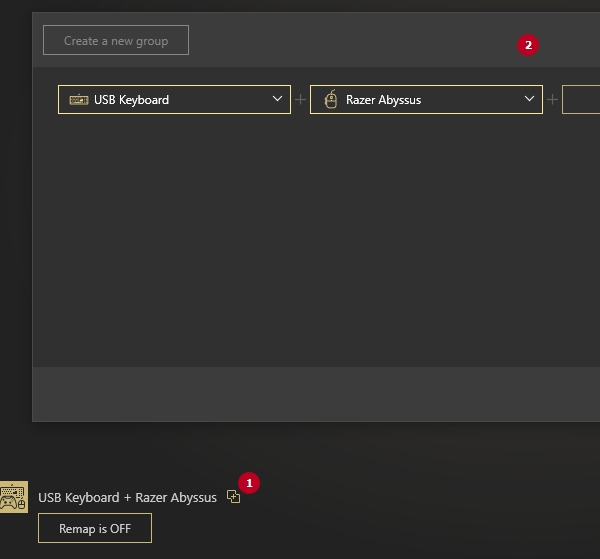
2. It may be a chance that something is wrong with the device initialization. Please show me your group, like here:
Leave a comment:
-
You can see in my video, I show shift 0 (nothing there besides turn off rewasd), then Shift 1, has both my controls, as well as "E" key for Shift 1. I then Apply settings, and reWASD turns on. I then proceed to hit E, and nothing happens. (If it was working, my mouse would instantly stop moving because it is mimicking a controller, and unbinds mouse movement
Leave a comment:
-
Could you please send me your updated config, so I could check Q key right now?
You can leave the Main configuration empty, assign Q as Shift 1 modifier and assign all needed mappings inside this Shift only. I assume it is better to use Toggled Shift in this case, so you won't need to press and hold this key always when you want to use your mappings.Leave a comment:
-
Yes i did, but thats not the problem, the problem is Q isnt activating shift 1.Originally Posted by reWASDer View Post
On a side note, could I just put no controls on Shift 0 (So that Rewasd is basically off) and then put both my Mouse+ Keyboard config on my Shift1 Key? Would that make is so rewasd is inactive unless I'm "holding" shift 1 key?Leave a comment:
-
If you do not add anything to the Shift layer, then it inherits the mappings from your main configuration by default. If you want to have another behavior in the Shift layer, you need to set it to Do not inherit manually.
Have you checked this video: https://recordit.co/2JIscs1GOa ? It will help to see what I am talking about.Leave a comment:
-
Im guessing it didnt save my current settings to the file i uploaded then, because I already have Shift 1 to Keyboard [Q] like you posted in the screenshot. I also shouldnt have anything in shift 2, all it should have is the Keyboard Config on Shift 0, and The Mouse config to Shift 1. Then holding Q i will be able to use Shift 1 (mouse configuration) until i let go of Q. It doesnt matter if the keybinds inherit or not, im fine with whether they do or notOriginally Posted by reWASDer View PostLeave a comment:
-
Thank you for sharing!
In your config, both keyboard and mouse are remapped to the virtual controller in the Main configuration. I assume this is how you want it to work, right?
Still, there is no Shift with Q modifier, and your Shift 1 and Shift 2 layer do the same as Main, as all the settings are inherited.
You need to set Q as a modifier:
... and then you need to set Do not inherit to all keyboard keys and mouse buttons (the mouse directions are not inherited). Here is an example: https://recordit.co/2JIscs1GOa (Toggle is optional and is not required in your case).Leave a comment:
-
No i dont have rapid fire. However I dont want to "toggle" between them. I only want shift 1 activated while "holding" Q (that is my preference)Originally Posted by reWASDer View Post
I've attached my file, assuming it shows the edited things I've done to it (I downloaded a file from this website, edited it, then saved it)Leave a comment:
-
Please send us the config you are using to check what is going wrong. Right-click on the name of the config you're using to open the contextual menu, and choose Open file location. I am asking about *.rewasd file.
Also, please define which license you use. Do you have Rapid Fire feature enabled or not?Leave a comment:
-
On Shift 0 (Main configuration), I put only the Keyboard layout.Originally Posted by Shion View Post
On Shift 1, I put the Mouse layout for Controller.
I then Put the key for Shift1 to Left Windows / Q.
I saved/applied, and Turned on Rewasd.
However the shift is not working. When i press the Shift 1 key, its not using that map layout. What did i do wrong?Last edited by klaz48; 24.11.2021, 09:22.Leave a comment:
-
The switch between mouse remapped to a virtual controller stick and normal not remapped mouse you can use [Shifts]. We have an article on how to set up a key for that here.
You would also need a [Rapid Fire] feature, to be able to "toggle" between two modes, otherwise you'd have to hold the button for "normal mouse" mode.
Or you could use a [Slots] variant, though switching between them might take a second or two depending on the configs applied.Leave a comment:



Leave a comment: