
Hello,
Great! Glad that everything was sorted it out.
-
Oki, done, and it works now, thanks for support, and update in next release considering this strange case
BestLeave a comment:
-
Hello,
Thank you for your reply.
Great. Glad that's working. Please, quote the ImagePath, like this "C:\Program Files\reWASD\reWASDService.exe" in the registry. It will allow you to not stop the Argyle service.
We will also make changes from our side to prevent similar cases in the future.Leave a comment:
-
Hello,
You are right, there is a file named "Program" in the root folder of SystemDrive, it is a standard file of Argyle calibration software (used with a probe for display color correction), and used by Windows at boot to update the display LUT applied to the graphic card/monitor.
Blocking Argile display correction, the reWASD service start !
Btw, this service have a specific behaviour compared with the rest of the other installed, it is interresting to understand how the access is managed to the reWASD service
Registry hardcopy is here https://ibb.co/bgphKFm btw, the path is correct
Best.
Leave a comment:
-
Hello,
Thank you for the attachment the digital signature is fine. We had some research regarding error 193. and found some articles that have a possible solution.
Do you have file(s) named 'Program' in your SystemDrive folder or files named 'Common' in your ProgramFiles folder? As Windows locates the 'C:\Program' folder on your hard disk before the 'C:\Program Files\reWASD, for example, and then tries to run it but this is nit the origin software path.
Also, please check the ImagePath this registry thread - HKEY_LOCAL_MACHINE\SYSTEM\CurrentControlSet\Servic es\. Please take the screenshot. Does the path is similar to the directory where reWASD installed?
Links that are described error 193 are:
1. http://gerryhampsoncm.blogspot.com/2...error-193.html
2. https://www.mindtimebackup.eu/knowle...-Error-1930xc1
We would appreciate it if you look them through regarding the reported problem and apply the suggestions they provide.Leave a comment:
-
Hi,
"unfortunalty" as already listed in previous post, overall checks was performed without error, and last sfc run just now do not return any error, system is validated as safe and uncompromized, with ~270 running services, that reWASDService is stop and in error at try to start.
Certificate export was performed, here is your file: http://dl.free.fr/jJfx8gSy5
Thanks for support.
Leave a comment:
-
Hello,
Back again with updated info. We checked the log and found that service fails to start with error 193, which looks like the RewasdService.exe file or broken integrity of some system catalogs.
00000006 logging 6492 12820 1 04\25\2020-12:15:33:766 Service installed successfully.
00000007 logging 6492 12820 1 04\25\2020-12:15:33:766 Service description set to 'Used to map buttons on game controller to keyboard and mouse events'.
00000008 logging 6492 12820 0 04\25\2020-12:15:33:768 StartService failed, error 193.
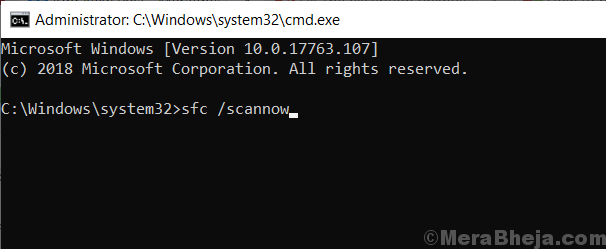
Therefore, may I ask you to scan your system with System File Checker tool to repair missing or corrupted system files - https://support.microsoft.com/en-us/...rrupted-system.
Also, please check the digital signature of the reWASDService.exe process and export and share the certification information, like this - https://recordit.co/TvALEWNGP7Leave a comment:
-
Hello,
Thank you for reply and logs, we will back again as soon check the logs.
Thank you.Leave a comment:
-
Leave a comment:
-
Hello,
Thank you for your reply.
We've tried to reproduce the problem by installing ver. 5.3 on - Windows 10 Pro Insider Build 19608 200410-1438. No problems were detected during installation and launch.
So, please collect logs using the steps above to find the problem reason.
Thank you in advance.Leave a comment:
-
Thanks for your answer,
I assume a misunderstanding as Insider have no direct dependancies with .NET from which the reWASD service crash seems to be link ...
.NET is installed as separate package, and no preview ".NET Insider" is install by "Windows Insider" directly, btw, no preliminary version of .NET is configured on the running environnement, only standard ones last release 4.5 and 3.5 etc.
But, even if hundreds of installed applications are working wo/issues, following your guide, a reinstall of .NET was performed, without any change on reWASD service crash, as sfc or check disk was not returning any errors ...
The switch-off of non-Windows services was performed but as the filtering function is not strictly avoiding windows services stop, it provoked a system loading error ... assuming few new standard Windows services was unfortunatly switched-off.
The rest of proposed guide suggestions is not acceptable as a System Restore is a bit "strong" for only a non-running single service ... assuming others non-windows services and applications are running fine.
Investigating on my own, I understood following discussions on some forums, that service model of Windows 10 new releases is provoking issues with few third-party applications, it seems that the service creation is not correct, linked with Services Control Disptacher model that is different in Windows new releases.
Best.
Leave a comment:
-
Hello,
Haven't heard you in a while. Is the problem persist? I would ask you to collect driver logs if you don't mind.
1 Extract "reWASDLogging_tracelog.zip" archive we shared with the link -http://files.disc-soft.com/filer/shared/1587715946/414/.
2. Open cmd via Administrator and navigate to a directory where reWASDLogging_logman was extracted. You will be able to see two files(StartLog.bat and StopLog.bat).
3.Type StartLog.bat
4. Install the reWASD.
5. Type StopLog.bat in cmd. Open the directory and copy the log archive to another directory. Remove the log.zip and log folder in the reWASDLogging folder.
6. Reboot the PC.
7. Open the cmd again. Do the same steps to run StartLog.bat again. Open the installed reWASD to reproduce the reported above problem.
8. Once the error messages reproduced back to the cmd and type StopLog.bat.
9. Open reWASDLogging and copy the archive the same directory where the first log was copied before the PC reboot.
10. Send us archives for the investigating.
Important to collect the log of reWASD installation before the PC reboot and the log when reWASD is launched after the reboot.
Also, I made footage that also describes the steps above - https://streamable.com/uf7hsu
Let us know if any questions come up.
Leave a comment:
-
Hello,
Thank you for shared the logs.
According to logs, we see that there are some system exception - 0xe0434352
It seems that something is not going OK in your system. It pretty often happens with Insider builds. I would suggest trying to fix the code exception by following this guide -
Leave a comment:
-
Hello, thanks for your support.
As listed in original post, all antiviruses are unactivated during overall tests to install (btw it is Malwarebytes Premium), but do it full reinstall again, with same result.
The service is not running, it is registred, but trying manually to start it do not start with Error 193:0xc1
But you are right, 2x errors are listed in Event Mgr:
1 - Invalid Operation
Version du Framework : v4.0.30319
Description : le processus a été arrêté en raison d'une exception non gérée.
Informations sur l'exception : System.InvalidOperationException
à System.Windows.Application.GetResourcePackage(Syst em.Uri)
à System.Windows.Application.GetResourceOrContentPar t(System.Uri)
à System.Windows.Application.LoadComponent(System.Ob ject, System.Uri)
Informations sur l'exception : System.Windows.Markup.XamlParseException
à System.Windows.Markup.XamlReader.RewrapException(S ystem.Exception, System.Xaml.IXamlLineInfo, System.Uri)
à System.Windows.Markup.WpfXamlLoader.Load(System.Xa ml.XamlReader, System.Xaml.IXamlObjectWriterFactory, Boolean, System.Object, System.Xaml.XamlObjectWriterSettings, System.Uri)
à System.Windows.ResourceDictionary.CreateObject(Sys tem.Windows.Baml2006.KeyRecord)
à System.Windows.ResourceDictionary.OnGettingValue(S ystem.Object, System.Object ByRef, Boolean ByRef)
à System.Windows.ResourceDictionary.OnGettingValuePr ivate(System.Object, System.Object ByRef, Boolean ByRef)
à System.Windows.ResourceDictionary.GetValueWithoutL ock(System.Object, Boolean ByRef)
à System.Windows.ResourceDictionary.GetValue(System. Object, Boolean ByRef)
à XBEliteWPF.Views.MainWindow.OnContentRendered(Syst em.Object, System.EventArgs)
à System.Windows.Window.OnContentRendered(System.Eve ntArgs)
à System.Windows.Window.<PostContentRendered>b__202_ 0(System.Object)
à System.Windows.Threading.ExceptionWrapper.Internal RealCall(System.Delegate, System.Object, Int32)
à System.Windows.Threading.ExceptionWrapper.TryCatch When(System.Object, System.Delegate, System.Object, Int32, System.Delegate)
à System.Windows.Threading.DispatcherOperation.Invok eImpl()
à MS.Internal.CulturePreservingExecutionContext.Call backWrapper(System.Object)
à System.Threading.ExecutionContext.RunInternal(Syst em.Threading.ExecutionContext, System.Threading.ContextCallback, System.Object, Boolean)
à System.Threading.ExecutionContext.Run(System.Threa ding.ExecutionContext, System.Threading.ContextCallback, System.Object, Boolean)
à System.Threading.ExecutionContext.Run(System.Threa ding.ExecutionContext, System.Threading.ContextCallback, System.Object)
à MS.Internal.CulturePreservingExecutionContext.Run( MS.Internal.CulturePreservingExecutionContext, System.Threading.ContextCallback, System.Object)
à System.Windows.Threading.DispatcherOperation.Invok e()
à System.Windows.Threading.Dispatcher.ProcessQueue()
à System.Windows.Threading.Dispatcher.WndProcHook(In tPtr, Int32, IntPtr, IntPtr, Boolean ByRef)
à MS.Win32.HwndWrapper.WndProc(IntPtr, Int32, IntPtr, IntPtr, Boolean ByRef)
à MS.Win32.HwndSubclass.DispatcherCallbackOperation( System.Object)
à System.Windows.Threading.ExceptionWrapper.Internal RealCall(System.Delegate, System.Object, Int32)
à System.Windows.Threading.ExceptionWrapper.TryCatch When(System.Object, System.Delegate, System.Object, Int32, System.Delegate)
à System.Windows.Threading.Dispatcher.LegacyInvokeIm pl(System.Windows.Threading.DispatcherPriority, System.TimeSpan, System.Delegate, System.Object, Int32)
à MS.Win32.HwndSubclass.SubclassWndProc(IntPtr, Int32, IntPtr, IntPtr)
à MS.Win32.UnsafeNativeMethods.DispatchMessage(Syste m.Windows.Interop.MSG ByRef)
à System.Windows.Threading.Dispatcher.PushFrameImpl( System.Windows.Threading.DispatcherFrame)
à System.Windows.Window.ShowHelper(System.Object)
à System.Windows.Window.ShowDialog()
à XBEliteWPF.App.CreateRecreateMainWindow(Boolean)
à XBEliteWPF.App.OnStartup(System.Windows.StartupEve ntArgs)
à System.Windows.Application.<.ctor>b__1_0(System.Ob ject)
à System.Windows.Threading.ExceptionWrapper.Internal RealCall(System.Delegate, System.Object, Int32)
à System.Windows.Threading.ExceptionWrapper.TryCatch When(System.Object, System.Delegate, System.Object, Int32, System.Delegate)
à System.Windows.Threading.DispatcherOperation.Invok eImpl()
à MS.Internal.CulturePreservingExecutionContext.Call backWrapper(System.Object)
à System.Threading.ExecutionContext.RunInternal(Syst em.Threading.ExecutionContext, System.Threading.ContextCallback, System.Object, Boolean)
à System.Threading.ExecutionContext.Run(System.Threa ding.ExecutionContext, System.Threading.ContextCallback, System.Object, Boolean)
à System.Threading.ExecutionContext.Run(System.Threa ding.ExecutionContext, System.Threading.ContextCallback, System.Object)
à MS.Internal.CulturePreservingExecutionContext.Run( MS.Internal.CulturePreservingExecutionContext, System.Threading.ContextCallback, System.Object)
à System.Windows.Threading.DispatcherOperation.Invok e()
à System.Windows.Threading.Dispatcher.ProcessQueue()
à System.Windows.Threading.Dispatcher.WndProcHook(In tPtr, Int32, IntPtr, IntPtr, Boolean ByRef)
à MS.Win32.HwndWrapper.WndProc(IntPtr, Int32, IntPtr, IntPtr, Boolean ByRef)
à MS.Win32.HwndSubclass.DispatcherCallbackOperation( System.Object)
à System.Windows.Threading.ExceptionWrapper.Internal RealCall(System.Delegate, System.Object, Int32)
à System.Windows.Threading.ExceptionWrapper.TryCatch When(System.Object, System.Delegate, System.Object, Int32, System.Delegate)
à System.Windows.Threading.Dispatcher.LegacyInvokeIm pl(System.Windows.Threading.DispatcherPriority, System.TimeSpan, System.Delegate, System.Object, Int32)
à MS.Win32.HwndSubclass.SubclassWndProc(IntPtr, Int32, IntPtr, IntPtr)
à MS.Win32.UnsafeNativeMethods.DispatchMessage(Syste m.Windows.Interop.MSG ByRef)
à System.Windows.Threading.Dispatcher.PushFrameImpl( System.Windows.Threading.DispatcherFrame)
à System.Windows.Application.RunDispatcher(System.Ob ject)
à System.Windows.Application.RunInternal(System.Wind ows.Window)
à XBEliteWPF.App.Main()
2 - Application Error
Nom de l’application défaillante reWASD.exe, version : 5.3.0.2094, horodatage : 0x5e726382
Nom du module défaillant : KERNELBASE.dll, version : 10.0.19608.1000, horodatage : 0x736e1b4b
Code d’exception : 0xe0434352
Décalage d’erreur : 0x0000000000022c2c
ID du processus défaillant : 0x3918
Heure de début de l’application défaillante : 0x01d6157c064f87c6
Chemin d’accès de l’application défaillante : C:\Program Files\reWASD\reWASD.exe
Chemin d’accès du module défaillant: C:\WINDOWS\System32\KERNELBASE.dll
Hope this could help,
Thanks !Leave a comment:
-
Hello,
Thank you for your reply.
Is the service running? What antivirus software do you have installed?
May I ask you to disable temporary all active antiviruses components and try again, like uninstall reWASD completely, reboot, then deactivate antivirus, try to install reWASD again?
Have you checked the Event Viewer for errors related to the reWASD?
1. Press the Windows button, type 'Event Viewer', press Enter 2. Choose Windows Logs in the upper left corner, then choose Application 3. Check out the panel on the right side: there's a Find option. Click it, and type 'reWASD' to search for related errors.
Once you'll find one or multiple events, please right-click them, and choose 'Save selected events...'.Leave a comment:

Leave a comment: