
Originally Posted by jeynos
View Post
-
I'm glad to know that you find the alternative use that I give to the Joy-con interesting. I think that for people with quadriplegia (as is my case) it's a very good way to enjoy video games. For this reason, I think that if the "Yaw" axis can be made to work in the "Tilt" mode, it would be very positive for a full use of the Joy-con with the reWASD software. 😃 -
Yes, I agree that for throttle and brake the tilt mode is necessary. I hope reWASD can fix the bug so that tilt mode works with Yaw axis so this is will work. It seems like they should be able to fix it because while in Gyro mode reWASD clearly can see the input for Yaw axis movement, so it should be able to do so for tilt mode as well.Originally Posted by Santi-Tetra View PostLeave a comment:
-
Hi, jeynos.Originally Posted by jeynos View Post
In this video I show you how behaves in my game the "gyro" mode vs "tilt" mode. As you can see, I think the "tilt" mode is better suited to my intention to trotte and brake. I've, however, to test it more thoroughly, because when I made the video, I realized that I had the axes confused in my mind.
Thanks, as always, everyone for your help on this issue.Leave a comment:
-
Yep, I can confirm that Yaw steering axis does not work in any tilt mode even on Mouse, only on Gyro mode. So it has nothing to do with whether it is controller or mouse input but only if using Gyro Mode or Tilt ModeLeave a comment:
-
Santi-Tetra
Hello again
I've doubled checked info about swapping the yaw and roll axes on a Joy-Con controller with guys from reWASD, and I was informed that this option really doesn't work in Tilt mode. I guess that it will be added some notification in the GUI that this option is not working.
However, if you are using tilt mode, the Reset Tilt command must be applied when changing the position of the gamepad from horizontal to vertical (and back again)
You can add this common to any key of your joycon Leave a comment:
-
Ah, that is a very interesting use of the JoyCon! I think this will indeed be possible once the Yaw axis is working correctly. I still think it will be helpful to have a button set to 'Toggle Gyro On/Off' to reset the center point when necessaryOriginally Posted by Santi-Tetra View Post
Leave a comment:
-
Santi-Tetra jeynos Thanks for all the information you provided.
We will research it and try to get back with news as soon as possible.Leave a comment:
-
I just recorded a video with the use that I am giving to the Joy-con controller. Forgive you to me my lousy spoken english. I have put all the good will that I could. 😃😉
I hope it can help you better understand the issue I've with the Joy-con controller and the final use I want to give it 😉
Thak you for everything!!!Leave a comment:
-
Hey, I realized the video I sent was using gyro to mouse, not Gamepad like your videos. So I wanted to go check and see if I can recreate the issue you have and you are right the steering axis does not work for Yaw when using gamepad input. I have made some videos to show this bug. All of this is using official Switch JoyCon.Originally Posted by Santi-Tetra View Post
First off, here is a video showing the difference between Gyro mode and Tilt mode as I think it may help you with what you are trying to do
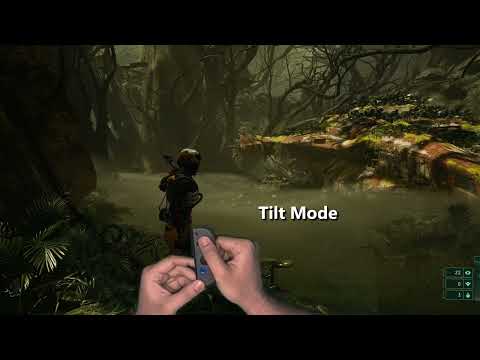
As you can see, in Gyro mode every movement gets sent as it's own input and it is not continuous unless you continue moving. In Tilt mode it continually gives input as long as you tilt away from the 'center point' like an analog stick does. The center point is the position the JoyCon is in when gyro is turned on, for this reason I think it is helpful to have a button mapped to 'Toggle Gyro On/Off' so you can easily set a new 'center' point if neccessary.
Ok here is the video showing the issue:
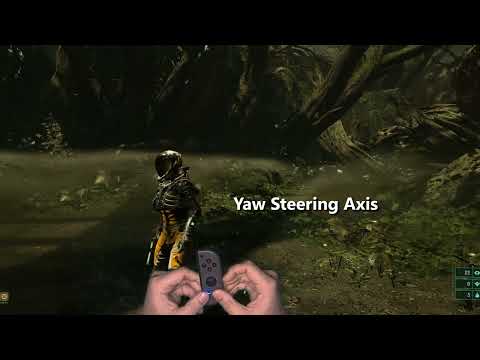
First I show that reWASD has it's Gyro Steering Axis set to Roll, and in game it works correctly with Roll giving right to left movement. Pitch is inverted but still works correctly(can be easily fixed in reWASD), and Yaw gives no input at all.
Then I go back to reWASD and switch Gyro Steering Axis to Yaw and go back into the game and you can see everything is exactly the same. Roll gives left-right X-axis movement, and Yaw still does nothing and gives no input.
Then I went back and made another config using Gyro to Mouse to see if it has the same issue, and Mouse does not have the same problem.
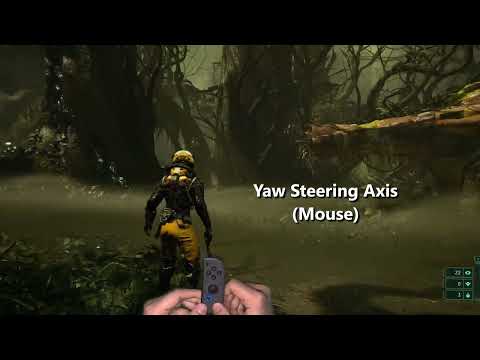
Here I show that when using a mouse config, both Yaw and Roll Steering Axis work correctly.
So the issue is that when using Xinput gamepad config the Yaw / Roll Steering toggle does not work, it is always on Roll regardless of what is set.
I think this is a reWASD bug so hopefully it can be fixed.
I have attached both configs I used to do these tests
Leave a comment:
-
I'm Spanish and I write more or less well in English but I don't speak it. I will try to explain the issue as best I can. Does any of you understand spoken Spanish, who can translate (if you need it) what I say in a spoken video that I would make where I explain the issue?Leave a comment:
-
I'm afraid that I don't fully understand the issue you have. I would appreciate it if you could describe how it should work in the end. As far as I understand, the gyro of your Joycon works as described.
You can also record a video or describe how it should work in the game exactly.Leave a comment:
-
Hi.
I have created a backup of my OS before doing the tests. With it done, I have taken advantage of the fact that I had another previous backup in which there was no 3rd party software installed and the issues persist. So, I have installed Windows 10 from 0 (clean installation 100%) but when I start reWASD it tells me that I have to revoke the license of the PC. And if I make that revocation I have to wait 6 months until I can exercise it again. Before this situation I have not dared to revoke my PC license, that the issues could be due to a Windows 10 update (for example), and having to reinstall all the softwares on my computer. Reinstalling everything is a task that takes me between 4 and 5 days that I don't have because I'm leaving shortly on holydays. Therefore, I have recovered the backup that I created yesterday.
I don't know if it will serve as a guide but my brother's computer only has Windows 10, Office Enterprise 2007, Steam and the game DiRT Rally 2.0 installed (I also have these software installed on my two computers, as well as others). These same issues are also reproduced on my brother's computer. My brother has a controller "Nintendo Switch Pro Controller" and also with that controller the same thing happens that with my Joy-con. Both drivers on all three computers have these issues equally.Leave a comment:
-
Installing reWASD on a clean Windows might be the best way to understand the core of the issues.Leave a comment:


Leave a comment: